Social Link Container
Editable list of platform-labelled social link fields with add/remove and a platform picker.
Contents
1 Overview
5 Events
6 Methods
7 Usage
Overview
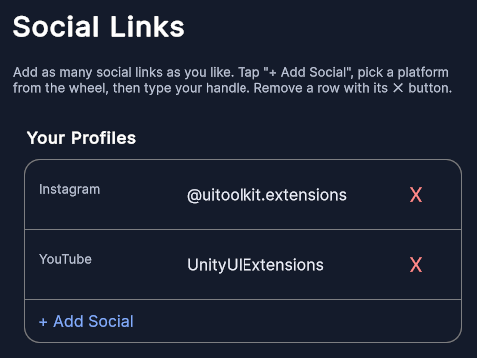
SocialLinkContainer is an editable list of social links — one row per platform, each a labelled URL/handle field. In edit mode an add button inserts a new row whose platform is chosen from a DropDownControl wheel picker; only platforms not already present are offered. Choosing a platform commits the row, and dismissing the picker without a choice discards it. Each committed row can carry a remove button.
The control carries no localization dependency: platform display names and field placeholders come from optional resolver delegates (PlatformNameResolver / PlatformPlaceholderResolver), defaulting to the enum name and a generic "Enter your {platform} handle" placeholder. Entered links are read back as a List<SocialLink> via GetSocials().
Typical use cases:
- A profile editor’s “social links” section (Instagram, Twitter, YouTube…)
- Any settings screen that collects a small, de-duplicated set of platform URLs
Nested Types
| Type | Description |
|---|---|
SocialPlatform |
Enum of supported platforms: Instagram, Twitter, Facebook, LinkedIn, TikTok, YouTube, Patreon. |
SocialLink |
Serializable { string platform; string url; } pair returned by GetSocials(). |
Properties
| Name | Description | Options |
|---|---|---|
Label |
Optional heading shown above the list; empty hides it. (UXML: label) |
string |
IsInEditMode |
When true, shows the add button and gives each row a remove button. (UXML: edit-mode) |
bool |
AddLabel |
Text on the add button. Defaults to "+ Add Social". (UXML: add-label) |
string |
SelectPlatformLabel |
Placeholder row shown at the top of the platform picker. Defaults to "Select platform". (UXML: select-platform-label) |
string |
RemoveButtonText |
Text on each row’s remove button. Defaults to "X". (UXML: remove-button-text) |
string |
PlatformNameResolver |
Delegate mapping a SocialPlatform to its display name. Defaults to the enum name. |
Func<SocialPlatform,string> |
PlatformPlaceholderResolver |
Delegate mapping a SocialPlatform to its field placeholder. |
Func<SocialPlatform,string> |
USS Classes
| Class | Description |
|---|---|
socialLinkContainer |
Root element. |
socialLinkContainer__label |
Optional heading label. |
socialLinkContainer__container |
Wrapper holding the rows and the add button. |
socialLinkContainer__containerChild |
A single social-link row. |
socialLinkContainer__containerChildInput |
The TextField for a row’s URL/handle. |
socialLinkContainer__addButton |
The “add social” button (edit mode only). |
socialLinkContainer__containerChildRemoveButton |
A row’s remove button (edit mode only). |
socialLinkContainer__platformPicker |
The DropDownControl used to pick the platform for a new row. |
Events
| Name | Description | Arguments |
|---|---|---|
OnSocialClicked |
Raised when a row’s field is tapped. | SocialPlatform, string (current value) |
OnRemoveSocialButtonClicked |
Raised after a row is removed. | SocialPlatform, string (value at removal) |
Methods
| Signature | Description |
|---|---|
CreateSocial(SocialPlatform platform, string value = "") |
Adds a committed row for platform pre-filled with value. Returns the row element. |
GetSocials() |
Returns the non-empty entered links as List<SocialLink>. |
ClearSocials() |
Removes all rows (and any pending picker row). |
SetBackgroundColor(Color color) |
Sets the container’s background colour. |
Usage
Add the control to your scene using:
GameObject -> UI Toolkit -> Extensions -> Social Link Container
This creates a UIDocument in the scene (plus a PanelSettings with the default runtime theme, if the project has none) and assigns an editable starter template with demo content, copied to Assets/UI Toolkit Extensions.
A starter template can also be added to an existing document using:
Assets -> Create -> UI Toolkit -> Extensions -> Social Link Container Starter
Alternatively, drag the control into a document from the UI Builder Library (Project -> Custom Controls -> UnityUIToolkit.Extensions) or declare it directly in UXML:
<ui:UXML xmlns:ui="UnityEngine.UIElements" xmlns:ext="UnityUIToolkit.Extensions" editor-extension-mode="False">
    <ext:SocialLinkContainer label="Your Profiles" edit-mode="true" />
</ui:UXML>
The shared extensions stylesheet is applied automatically when the control is created in the Editor and in Play Mode, so no manual stylesheet reference is needed while authoring. The starter templates also reference the stylesheet explicitly, which covers player builds; for hand-written UXML or code-first UI in builds, add the stylesheet to your UXML or panel theme.
Using the Control
A profile editor’s social section
using UnityEngine;
using UnityEngine.UIElements;
using UnityUIToolkit.Extensions;

public class ProfileSocialsController : MonoBehaviour
{
    [SerializeField] private UIDocument _document;

    private SocialLinkContainer _socials;

    private void OnEnable()
    {
        _socials = _document.rootVisualElement.Q<SocialLinkContainer>("socials");
        _socials.Label = "Social Links";
        _socials.IsInEditMode = true;

        // Friendly display names / placeholders without a localization dependency.
        _socials.PlatformNameResolver = p => p.ToString();
        _socials.PlatformPlaceholderResolver = p => $"your {p} URL";

        // Seed from saved data.
        _socials.CreateSocial(SocialLinkContainer.SocialPlatform.Instagram, "https://instagram.com/me");

        _socials.OnRemoveSocialButtonClicked += (platform, url) => Debug.Log($"Removed {platform}");
    }

    public void Save()
    {
        foreach (var link in _socials.GetSocials())
            Debug.Log($"{link.platform} -> {link.url}");
    }
}
Video Demo
Example Scenes
This control is demonstrated in the following package example:
Credits and Donation
SimonDarksideJ
External links
| UI Toolkit Extensions repository | OpenUPM package |
Demonstrated In
- Social Links — An editable social-links section with add/remove rows and a platform picker that hides already-used platforms.