Scroll Snap
Swipe/drag paged scroll container that snaps to discrete pages by index.
Contents
1 Overview
3 Events
4 Usage
5 Using the Control in Manual Mode
6 Using the Control in Swipe Mode
7 Restricted Movement and Event Behavior
Overview
ScrollSnap is a page-based UI Toolkit container that arranges children as pages and snaps to a page boundary after gesture or wheel input. It supports:
- Horizontal or vertical paging
- Programmatic page navigation (
GoToPage,MoveNext,MovePrevious) - Optional touch/pointer gesture control
- Optional validation/restriction flow for swipe attempts
- Smooth snap animation with configurable easing
- Page spacing via per-page paddings
Typical use cases:
- Onboarding or wizard flows
- Carousel-like page navigation
- Validation-gated step transitions (for example: required fields before moving forward)
Properties
| Name | Description | Options |
|---|---|---|
Orientation |
Paging axis for layout and swipe direction. | Horizontal (default), Vertical |
PageSize |
Explicit page size in pixels. If <= 0, uses viewport resolved size (width for horizontal, height for vertical). |
float (<= 0 means auto) |
ManualMovementEnabled |
Enables pointer/touch and wheel gesture handling by the control. If disabled, input gestures are ignored and only programmatic navigation changes pages. | true / false (default false) |
OnlySinglePageSwipeAllowed |
Limits swipe transitions to one page max per completed gesture. Keeps behavior predictable for step-based flows. | true / false (default true) |
ValidatePageChange |
Enables swipe validation behavior using direction flags and optional async validator callback. | true / false (default false) |
CanMoveNextPage |
Forward movement gate when validation is enabled. Typically set externally before allowing the next forward step. | true / false (default true, reset to false after page change when validation is enabled) |
CanMoveBackPage |
Backward movement gate when validation is enabled. | true / false (default true, reset to false after page change when validation is enabled) |
AllowMoveBack |
Master backward permission gate when validation is enabled. If false, backward swipe attempts are restricted and snap back. |
true / false (default true) |
ValidationDragLimit |
Maximum blocked-drag preview distance as a fraction of page size (0..1). Example: 0.2 allows 20% drag before clamp while restricted. |
float in 0..1 (default 0.2) |
IsValidatingPageChange |
Read-only state indicating an async page validation callback is currently running. | bool (read-only) |
PagePaddingLeft |
Left padding/gap per page (applied as margin). | float pixels, >= 0 |
PagePaddingRight |
Right padding/gap per page (applied as margin). | float pixels, >= 0 |
PagePaddingTop |
Top padding/gap per page (applied as margin). | float pixels, >= 0 |
PagePaddingBottom |
Bottom padding/gap per page (applied as margin). | float pixels, >= 0 |
PageCount |
Number of child pages in contentContainer. |
int (read-only) |
CurrentPageIndex |
Current snapped page index. | int (read-only) |
USS Custom Properties
| Name | Description | Default |
|---|---|---|
--scrollsnap-easing |
Snap animation easing function name. | Linear |
--scrollsnap-page-padding-left |
Left page margin/padding from USS. | 0px |
--scrollsnap-page-padding-right |
Right page margin/padding from USS. | 0px |
--scrollsnap-page-padding-top |
Top page margin/padding from USS. | 0px |
--scrollsnap-page-padding-bottom |
Bottom page margin/padding from USS. | 0px |
--scrollsnap-validation-drag-limit |
Optional validation drag-limit value (fraction). Use values like 0.2, 0.15, 0.3. |
Not set unless provided |
Events
| Name | Description | Arguments |
|---|---|---|
PageChanged |
Fired when CurrentPageIndex changes after a completed transition/snap. |
(int currentPageIndex) |
OnPageStartChange |
Fired when a swipe attempt resolves to a target page and validation logic begins. Host can pre-load target content and inspect whether movement is currently allowed by flags. | (int targetPage, bool moveAllowed) |
OnPageChangeRestricted |
Fired when a swipe attempt is denied and the control has completed returning/snapping back to the active page. Useful for user feedback animations/toasts. The argument is the attempted destination page index. | (int attemptedTargetPage) |
OnValidatePageTransition |
Optional async validator callback. Called when validation mode is enabled and direction flags allow movement. Return true to proceed, false to restrict and snap back. |
(int targetPage) => Task<bool> |
Note: OnPageChangePrevented is not a built-in ScrollSnap event name. It is a consumer-defined callback method name commonly subscribed to OnPageChangeRestricted, for example: scrollSnap.OnPageChangeRestricted += OnPageChangePrevented;.
Usage
Add the control to your scene using:
GameObject -> UI Toolkit -> Extensions -> Scroll Snap
This creates a UIDocument in the scene (plus a PanelSettings with the default runtime theme, if the project has none) and assigns an editable starter template with demo content, copied to Assets/UI Toolkit Extensions.
A starter template can also be added to an existing document using:
Assets -> Create -> UI Toolkit -> Extensions -> Scroll Snap Starter
Alternatively, drag the control into a document from the UI Builder Library (Project -> Custom Controls -> UnityUIToolkit.Extensions) or declare it directly in UXML:
<ui:UXML xmlns:ui="UnityEngine.UIElements" xmlns:ext="UnityUIToolkit.Extensions" editor-extension-mode="False">
    <ext:ScrollSnap manual-movement-enabled="true" style="flex-grow: 1;">
        <ui:VisualElement><ui:Label text="Page 1" /></ui:VisualElement>
        <ui:VisualElement><ui:Label text="Page 2" /></ui:VisualElement>
        <ui:VisualElement><ui:Label text="Page 3" /></ui:VisualElement>
    </ext:ScrollSnap>
</ui:UXML>
The shared extensions stylesheet is applied automatically when the control is created in the Editor and in Play Mode, so no manual stylesheet reference is needed while authoring. The starter templates also reference the stylesheet explicitly, which covers player builds; for hand-written UXML or code-first UI in builds, add the stylesheet to your UXML or panel theme.
Using the Control in Manual Mode
Manual mode means gesture input is disabled and page movement is API-driven.
- Set
ManualMovementEnabled = false - Navigate only through
GoToPage,MoveNext,MovePrevious - Use
force: truewhen you want to bypass validation gates
Example:
var snap = new ScrollSnap();
snap.ManualMovementEnabled = false;

// Programmatic navigation
snap.GoToPage(2, animate: true);
snap.MoveNext(animate: true);

// Always move, even if validation mode and flags are restrictive
snap.MoveNext(animate: true, force: true);
Recommended when:
- Navigation is fully controlled by external UI buttons
- You need deterministic transitions with no user drag gestures
- Validation/permissions are handled outside swipe interaction
Using the Control in Swipe Mode
Swipe mode means gesture input is enabled and users can drag/swipe pages directly.
- Set
ManualMovementEnabled = true - Optionally keep
OnlySinglePageSwipeAllowed = truefor step-by-step flows - Enable
ValidatePageChange = trueto gate movement with restriction behavior
Example:
var snap = new ScrollSnap();
snap.ManualMovementEnabled = true;
snap.OnlySinglePageSwipeAllowed = true;
snap.ValidatePageChange = true;

// Host-controlled movement gates
snap.CanMoveNextPage = false;
snap.CanMoveBackPage = true;
snap.AllowMoveBack = true;

snap.OnPageStartChange += (targetPage, moveAllowed) =>
{
    // Prepare content for target page, optionally show pre-transition UI
};

snap.OnPageChangeRestricted += targetPage =>
{
    // Show why movement is blocked
};

snap.OnValidatePageTransition = async targetPage =>
{
    // Async validation (API call, form checks, etc.)
    await Task.Yield();
    return true;
};
Restricted Movement and Event Behavior
When ValidatePageChange = true, swipe transitions follow this flow:
- User swipes and a target page is derived.
- Direction gates are checked:
- Forward:
CanMoveNextPage - Backward:
AllowMoveBackandCanMoveBackPage
- Forward:
OnPageStartChange(targetPage, moveAllowed)is fired.- If blocked by gates:
- Drag is clamped by
ValidationDragLimit - On release, the control snaps back
OnPageChangeRestricted(targetPage)is fired after snap-back completes
- Drag is clamped by
- If allowed by gates and
OnValidatePageTransitionis assigned:- Async callback runs
true=> transition proceedsfalse=> restricted snap-back andOnPageChangeRestricted(after snap-back completes)
- On successful transition completion,
PageChanged(newPageIndex)is fired.
Authorization Flow (Validation-Gated Navigation)
Use this flow when page movement must be authorized by host logic (for example onboarding step completion, server-side checks, required field validation).
Core Idea
OnPageStartChangeis the early signal: user attempted a transition.moveAllowedindicates whether current direction gates allow a possible transition.OnValidatePageTransitionis the async authorization hook.OnPageChangeRestrictedis the post-snap-back signal (fires after return to the original page is complete).
Direction Detection
At OnPageStartChange(targetPage, moveAllowed), compare:
CurrentPageIndex(current/origin page)targetPage(attempted destination)
Rules:
targetPage > CurrentPageIndex=> forwardtargetPage < CurrentPageIndex=> backwardtargetPage == CurrentPageIndex=> no effective move
CurrentPageIndex does not advance until a successful page transition completes and PageChanged is raised.
Event Sequence: Authorized Success
OnPageStartChange(targetPage, true)- Optional
OnValidatePageTransition(targetPage)returnstrue - Transition animates to target
PageChanged(newPageIndex)
Event Sequence: Restricted by Gates
OnPageStartChange(targetPage, false)- Control animates back to origin page
OnPageChangeRestricted(attemptedTargetPage)fires after snap-back completion
Event Sequence: Async Authorization Denied
OnPageStartChange(targetPage, true)OnValidatePageTransition(targetPage)returnsfalse- Control animates back to origin page
OnPageChangeRestricted(attemptedTargetPage)fires after snap-back completion
Recommended Host Pattern
- In
OnPageStartChange: detect direction and optionally do lightweight target prep only whenmoveAllowedis true. - In
OnPageChangeRestricted: start validation/error animation (this now runs when the control has already returned to the origin page). - In
PageChanged: finalize UI state for the newly active page.
Important Notes
- While async validation is running,
IsValidatingPageChangeistrueand additional swipe gesture processing is ignored. CanMoveNextPageandCanMoveBackPageare reset tofalseafter a page change when validation mode is enabled.- Use fraction values for drag limit configuration (for example
0.2for 20%). - Programmatic movement remains available at all times via the
forceoverride:
snap.MoveNext(animate: true, force: true);
Programmatic API Summary
| Method | Purpose |
|---|---|
GoToPage(int index, bool animate = true, bool force = false) |
Navigate to a specific page |
MoveNext(bool animate = true, bool force = false) |
Navigate to next page |
MovePrevious(bool animate = true, bool force = false) |
Navigate to previous page |
Use force: true when a host flow has completed external validation and wants to advance immediately regardless of current swipe-gate state.
Video Demo
Example Scenes
This control is demonstrated in the following package examples:
Credits and Donation
SimonDarksideJ
External links
| UI Toolkit Extensions repository | OpenUPM package |
Demonstrated In
- Content Explorer — A full content-browsing screen that composes scroll-snap, collapsible sections, inputs, a loading state and toasts into one layout.
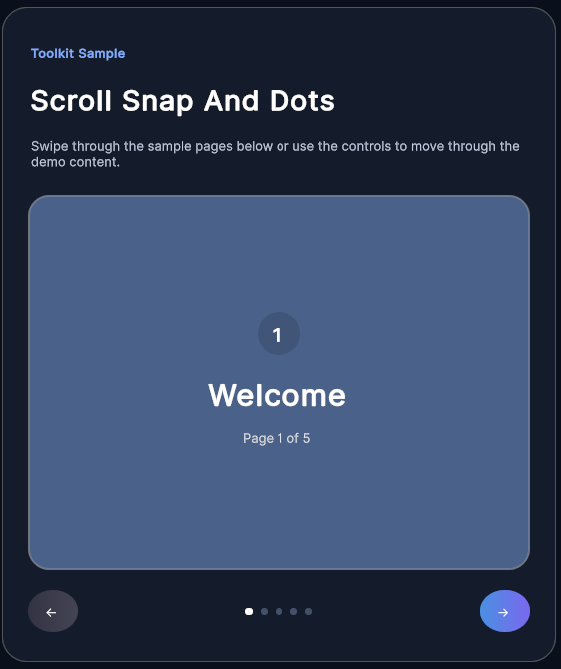
- Scroll Snap & Dots — A paged onboarding carousel — a swipeable scroll-snap container kept in sync with page-dot indicators.
- Scroll Snap (Split Views) — The same scroll-snap built three ways — pure C#, UXML, and a split layout — to compare authoring styles.