Dropdown Menu
Anchored overlay action menu with large tappable rows and backdrop-tap dismiss.
Contents
1 Overview
5 Methods
6 Usage
Overview
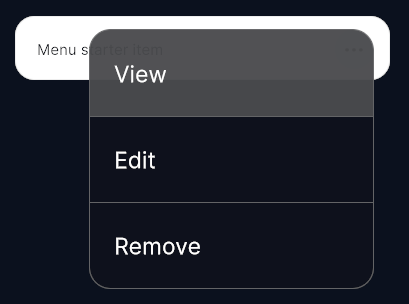
DropDownMenuControl is a lightweight, anchored drop-down action menu — the kind of overflow / context menu that opens from a “⋯” or avatar button. It opens as an overlay anchored to a trigger element and dismisses when the backdrop is tapped. Each option is a large, independently tappable row; choosing one closes the menu and invokes that option’s callback.
The menu injects a full-screen transparent backdrop and a floating panel directly into the panel’s root visual tree, so it is never clipped or constrained by the layout of its anchor. It is purely programmatic — construct it once and drive it with Open(...).
This is distinct from
DropDownControl, which is a value picker (wheel-style single-value select).DropDownMenuControlis an action menu: each row runs a callback rather than selecting a value.
Typical use cases:
- Overflow (“⋯”) menus on cards, list rows, or headers
- Right-click / long-press context actions (View, Edit, Remove…)
- Compact action menus anchored to an avatar or icon button
Nested Types
| Type | Description |
|---|---|
DropDownOption |
A readonly struct pairing a string Label with an Action OnSelected callback. Construct with new DropDownOption("Label", () => { … }). |
Placement |
Enum controlling how the panel is positioned relative to the anchor. |
Placement values
| Value | Behaviour |
|---|---|
AnchorRight |
Right edge aligned to the anchor’s right edge, dropping downward (flips upward on bottom overflow). The default. |
CenteredOnAnchor |
Centered on the anchor on both axes, clamped to the screen edges. |
Properties
| Name | Description | Options |
|---|---|---|
IsOpen |
(Read-only) Whether the menu is currently open. | bool |
USS Classes
| Class | Description |
|---|---|
dropDownMenuControl__backdrop |
Full-screen transparent backdrop injected behind the panel; tapping it closes the menu. |
dropDownMenuControl__panel |
The floating menu panel (fixed width, positioned by the control). |
dropDownMenuControl__row |
A single option row. Its USS height must stay in sync with the control’s RowHeightPx (96 px) used for overflow maths. |
dropDownMenuControl__row--first |
Modifier applied to the first row (e.g. to drop the top divider / round the top corners). |
dropDownMenuControl__rowLabel |
The label inside a row. Picking is ignored so the row receives the tap. |
Methods
| Signature | Description |
|---|---|
Open(VisualElement anchor, IReadOnlyList<DropDownOption> options, Placement placement = AnchorRight, Action onDismissed = null) |
Builds the rows and opens the menu anchored to anchor. Ignored if anchor/options are null or empty, or the anchor is not attached to a panel. Re-opening while open closes the previous instance first. |
Close() |
Closes the menu, removes the panel and backdrop, and invokes the onDismissed callback (unless an option was chosen, which clears it first). |
Usage
A starter can be added to your scene using:
GameObject -> UI Toolkit -> Extensions -> Drop Down Menu
This creates a UIDocument in the scene (plus a PanelSettings with the default runtime theme, if the project has none) and assigns an editable starter template — a single bordered item row with a “···” trigger — copied to Assets/UI Toolkit Extensions. Because this control has no UXML element, the menu entry also adds a
DropDownMenuStarterControllercomponent that constructs the menu and wires the trigger with three demo options; replace it with your own controller in real use.The starter layout (without the demo controller) can also be added to an existing document using:
Assets -> Create -> UI Toolkit -> Extensions -> Drop Down Menu Starter
In your own code, construct a DropDownMenuControl and call Open(anchor, options); the menu attaches itself to the panel root above all other content. The shared extensions stylesheet is applied automatically when the control is created.
Using the Control
Open an overflow menu from a button
using System.Collections.Generic;
using UnityEngine;
using UnityEngine.UIElements;
using UnityUIToolkit.Extensions;

public class CardActionsController : MonoBehaviour
{
    [SerializeField] private UIDocument _document;

    // Constructed in OnEnable — Unity does not allow VisualElements to be created
    // from a MonoBehaviour constructor or field initializer.
    private DropDownMenuControl _menu;

    private void OnEnable()
    {
        _menu = new DropDownMenuControl();

        var moreButton = _document.rootVisualElement.Q<Button>("more-button");

        moreButton.clicked += () =>
        {
            _menu.Open(moreButton, new List<DropDownMenuControl.DropDownOption>
            {
                new DropDownMenuControl.DropDownOption("View",   () => Debug.Log("View")),
                new DropDownMenuControl.DropDownOption("Edit",   () => Debug.Log("Edit")),
                new DropDownMenuControl.DropDownOption("Remove", () => Debug.Log("Remove")),
            },
            DropDownMenuControl.Placement.AnchorRight,
            onDismissed: () => Debug.Log("Menu dismissed without a choice"));
        };
    }
}
Video Demo
Example Scenes
This control is demonstrated in the following package example:
Credits and Donation
SimonDarksideJ
External links
| UI Toolkit Extensions repository | OpenUPM package |
Demonstrated In
- Action Menu — Anchored overflow menus — per-row ··· triggers and a centered card menu, with callback and dismiss handling.