Image Crop Overlay
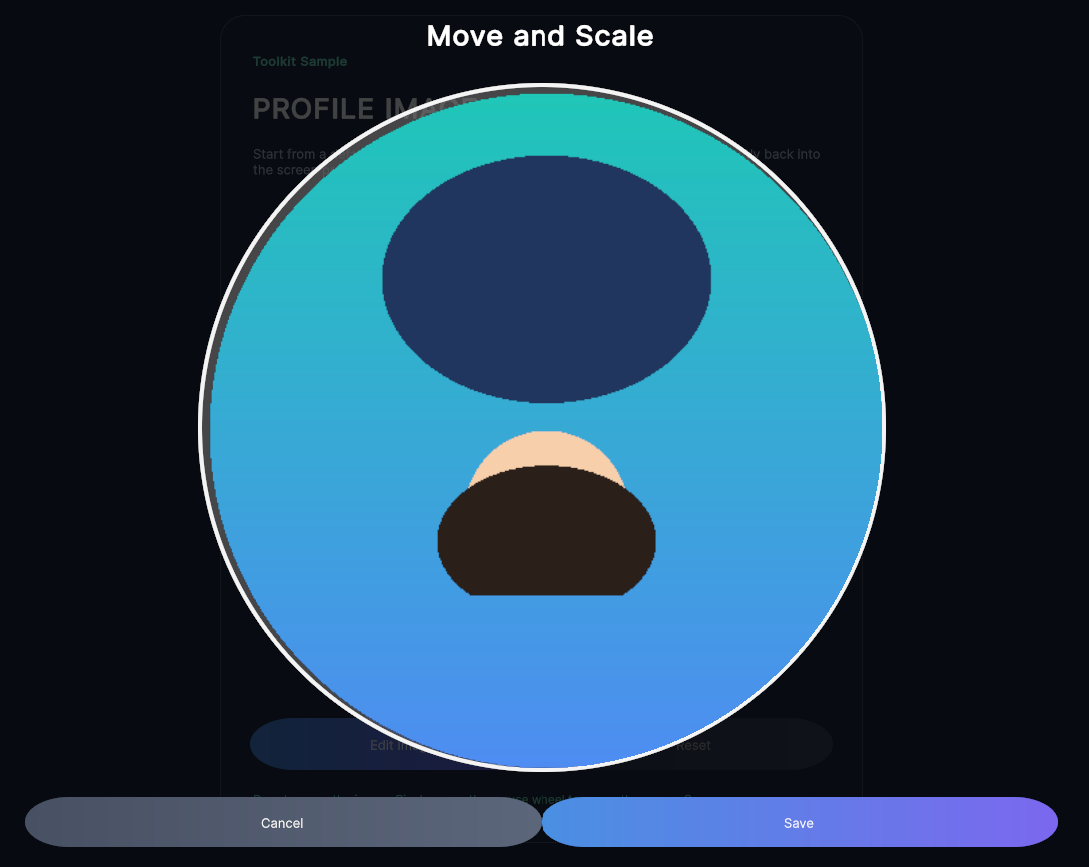
Full-screen modal image cropper with drag-to-pan, pinch-to-zoom, and configurable square export.
Contents
1 Overview
5 Usage
Overview
ImageCropOverlayControl is a full-screen modal cropper for square image exports. It displays the source image inside a movable and zoomable viewport, then exports the visible area to a new Texture2D when the user confirms.
Typical use cases:
- Profile picture editing before upload
- Cover-image cropping with a fixed export size
- Any UI Toolkit workflow that needs a self-contained move-and-scale image confirmation step
Nested Types
Configuration
Configuration customizes the overlay title, button labels, export size, zoom limits, screen margins, viewport width ratio, and normalized corner radius used by the crop viewport mask.
USS Classes
| Class | Description |
|---|---|
imageCropOverlay |
Full-screen modal root. |
imageCropOverlay__panel |
Centred container for the header, viewport, and footer. |
imageCropOverlay__header |
Header row that hosts the title. |
imageCropOverlay__title |
Title label. |
imageCropOverlay__viewportHost |
Layout host used to centre the crop viewport. |
imageCropOverlay__viewport |
Clipped crop viewport that receives drag, pinch, and wheel input. |
imageCropOverlay__image |
Absolute-positioned image surface inside the viewport. |
imageCropOverlay__footer |
Footer row for the action buttons. |
imageCropOverlay__buttonSlot |
Layout slot for each footer button. |
imageCropOverlay__button |
Shared button class applied to the cancel/save buttons. |
imageCropOverlay__button--cancel |
Modifier for the cancel button. |
imageCropOverlay__button--save |
Modifier for the save button. |
Public API
| Signature | Description |
|---|---|
Show(VisualElement anchor, Texture2D sourceTexture, Configuration configuration, Action<Texture2D> onConfirmed, Action onCancelled = null) |
Creates and displays the overlay on the anchor’s panel root. Returns the created overlay or null when it cannot be shown. |
CreateUniformCornerRadiusPercent(float percent) |
Creates a clamped, uniform normalized corner-radius vector for the crop mask. |
ResolveNormalizedCornerRadiusPercent(VisualElement sourceElement, Vector4 fallback) |
Converts the source element’s resolved pixel radii into normalized percentages suitable for the crop mask. |
Usage
This control is created from code and has no UXML element or editor menu entry.
Invoke the static ImageCropOverlayControl.Show(anchor, sourceTexture, configuration, onConfirmed) from code; the overlay attaches itself to the panel root. The shared extensions stylesheet is applied automatically when the control is created.
Using the Control
using UnityEngine;
using UnityEngine.UIElements;
using UnityUIToolkit.Extensions;

public class AvatarCropExample : MonoBehaviour
{
    [SerializeField] private UIDocument document;
    [SerializeField] private Texture2D avatarSource;

    private CircularImageButton avatarButton;

    private void OnEnable()
    {
        var root = document.rootVisualElement;

        avatarButton = new CircularImageButton();
        avatarButton.SetImage(avatarSource);
        avatarButton.Clicked += OpenCropper;

        root.Add(avatarButton);
    }

    private void OpenCropper()
    {
        var configuration = new ImageCropOverlayControl.Configuration
        {
            Title = "Move and Scale",
            ExportSize = 512,
            CornerRadiusPercent = ImageCropOverlayControl.CircleCornerRadiusPercent,
        };

        ImageCropOverlayControl.Show(
            avatarButton,
            avatarSource,
            configuration,
            cropped => avatarButton.SetImage(cropped));
    }
}
Example Scenes
This control is demonstrated in the following package example:
Credits and Donation
SimonDarksideJ
External links
| UI Toolkit Extensions repository | OpenUPM package |
Demonstrated In
- Image Crop Overlay — Pick an avatar image, then pan, pinch-zoom and crop it inside a full-screen modal overlay.