Selection Box
Drag to draw a rubber-band selection rectangle over multiple UI elements.
SelectionBox
An RTS style selection box control
Contents
1 Overview
3 Methods
4 Usage
6 See also
Overview
A selection box control to enable selecting 2D and 3D content within a Canvas / selectable area
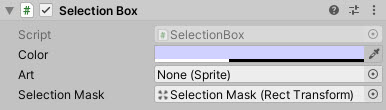
Properties
The properties of the Selectable Scalar control are as follows:
| Property | Description |
|---|---|
| Color | The color to apply to the selectable. |
| Art | The texture to draw as the background to the selectable area. |
| Selection Mask | The Rect Transform for the area that allows items to be selectable, restricts object being selected. |
Methods
This component does not expose public methods beyond inherited behaviour.
Usage
Add the Selection Box to the scene using:
“GameObject -> UI -> Extensions -> Selection Box”
Alternatively, add the component to an existing GameObject using:
“Add Component -> UI -> Extensions -> Selection Box”
Once setup, define a separate Rect Transform to specify the area of the screen that should be selectable. Any objects contained within the Selection mask will be selectable.
Additionally, you can customize the graphic used for the “Selection Box” that is drawn using the Art property.
Video Demo
See also
N/A
Credits and Donation
- Korindian
- BenZed
External links
N/A
Demonstrated In
- Selection Box — Drag a marquee box to multi-select items.