Selectable Scaler
Scales a Selectable component up/down on hover and press events.
Selectable Scalar
A simple tween scaler to affect Rect Transform scale on other controls.
Contents
1 Overview
3 Methods
4 Usage
6 See also
Overview
A simple Tween enhancement that scales another RectTransform according to a preset curve.
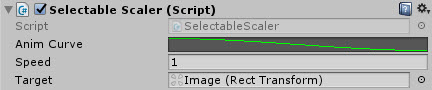
Properties
The properties of the Selectable Scalar control are as follows:
| Property | Description |
|---|---|
| Anim Curve | The curve that will be used to scale the Rect Transform in and out. |
| Speed | The speed at which the animation will take effect. |
| Target | The target for the animation. |
Methods
This component does not expose public methods beyond inherited behaviour.
Usage
Like with other Layout controls, simply add this control to any control that has a Selectable component (e.g. Button, NonGraphicSelectable) through the Add Component menu as follows:
“Add Component -> UI -> Extensions -> Selectable Scalar”
Video Demo
See also
Credits and Donation
Tomek S