Pagination Manager
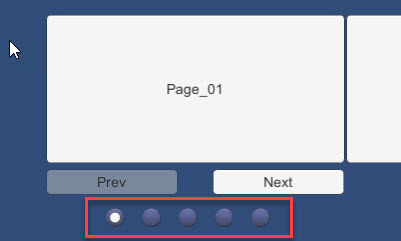
Connects a ScrollSnap or ContentScrollSnap to dot-style pagination indicators.
Pagination Manager
A management script to attach to the Horizontal or Vertical Scroll snaps to enable automatic click navigation.
Contents
1 Overview
3 Methods
4 Usage
6 See also
Overview
The Pagination Manager enables automatic click navigation for the Pagination features of the Horizontal and Vertical Scroll Snap controls.

The control extends the base Unity ToggleGroup functionality by interlinking the Scroll Snap’s functionality with the ToggleEvents automatically.
[!NOTE] You still have to set up the child toggles manually and ensure that the number of toggles matches the number of Scroll Snap Children. May extend in the future to automatically generate children from Prefabs.
Properties
The properties of the Box Slider control are as follows:
| Property | Description |
|---|---|
| Scroll Snap | The Horizontal or Vertical Scroll Snap control this Pagination is assocated with (overrides base Pagination capability) |
Inherited from ToggleGroup
- Allow Switch Off (non-functional)
Methods
This component does not expose public methods beyond inherited behaviour.
Usage
Simply add the “Pagination Manager” component using:
“Add Component -> UI -> Extensions -> Pagination Manager”
However, you will need to manually assign the Scroll Snap reference.
[!NOTE] This replaces the inherent pagination feature of the Scroll Snap. ———
Video Demo
See the “Pagination Manager” example scene in the “HSS-VSS-ScrollSnap” Examples folder
See also
N/A
Credits and Donation
Credit Brogan King
External links
Sourced from - https://bitbucket.org/UnityUIExtensions/unity-ui-extensions/issues/158/pagination-script